9.4 KiB
Flatpak Build
NOTE: Flatpaks are built with a wrapper repo, which downloads everything needed including the main torzu repo.
First install flatpak and flatpak-builder for your specific distro:
- Arch / Manjaro:
sudo pacman -Syu --needed flatpak flatpak-builder - Debian / Ubuntu / Linux Mint:
sudo apt-get install flatpak flatpak-builder - Fedora:
sudo dnf install flatpak flatpak-builder
Then install flatpak dependencies from within flatpak:
flatpak install org.kde.Sdk//5.15-23.08 io.qt.qtwebengine.BaseApp//5.15-23.08
Clone the torzu-flatpak repo and dependencies (note: this github repo is the correct one):
git clone --depth 1 --recursive https://github.com/litucks/onion.torzu_emu.torzu.git torzuFlatpak
Enter the cloned directory and run the build script:
cd torzuFlatpak && ./build.sh
The resulting torzu.flatpak will be in the same directory as the build script.
To install:
flatpak install torzu.flatpak
AppImage Build
The AppImage Builder is included in the main torzu repo.
First you must build a native linux version from the section below, with the resulting executables in the torzu/build/bin folder. Leave everything where it is.
After that you only have to run the following (assuming you're still in the build folder after running ninja):
cd .. && ./AppImage-build.sh
The script enters the AppImageBuilder folder and generates the AppImage executable.
The resulting torzu.AppImage file is moved back into the main root torzu folder where AppImage-build.sh is.
To run it:
./torzu.AppImage
These steps are included as an option in the native build instructions below!
NOTE: the native binaries will still be in the torzu/build/bin folder, so you can archive them to have both versions.
Native Builds
Dependencies (easy copy/paste commands provided after)
You'll need to download and install the following:
- GCC v11+ (for C++20 support) & misc
- This page is being updated as we transition to GCC 11
- If GCC 12 is installed, Clang v14+ is required for compiling
- CMake 3.15+
The following are handled by torzu's externals:
If version 5.15.2 is not already installed, pre-compiled binaries for Qt 5.15.2 will be downloaded from here automatically by CMake:
- Qt 5.15+
All other dependencies will be downloaded by vcpkg if needed:
- Boost 1.79.0+
- Catch2 2.13.7 - 2.13.9
- fmt 8.0.1+
- lz4 1.8+
- nlohmann_json 3.8+
- OpenSSL
- ZLIB 1.2+
- zstd 1.5+
Dependencies are listed here as commands that can be copied/pasted. Of course, they should be inspected before being run.
-
All Distros
- If an ARM64 build is intended, export
VCPKG_FORCE_SYSTEM_BINARIES=1.
- If an ARM64 build is intended, export
-
Arch / Manjaro:
sudo pacman -Syu --needed base-devel boost catch2 cmake ffmpeg fmt git glslang libzip lz4 mbedtls ninja nlohmann-json openssl opus qt5 sdl2 shasum unzip zip zlib zstd- Building with QT Web Engine needs to be specified when running CMake with the param
-DCMAKE_CXX_FLAGS="-I/usr/include/qt/QtWebEngineWidgets"with qt5-webengine installed. - GCC 11 or later is required.
- Building with QT Web Engine needs to be specified when running CMake with the param
-
Debian / Ubuntu / Linux Mint:
sudo apt-get install autoconf catch2 cmake g++-11 gcc-11 git glslang-tools libasound2 libavcodec-dev libavfilter-dev libboost-context-dev libfmt-dev libglu1-mesa-dev libhidapi-dev liblz4-dev libmbedtls-dev libpulse-dev libssl-dev libswscale-dev libtool libudev-dev libva-dev libxcb-icccm4 libxcb-image0 libxcb-keysyms1 libxcb-render-util0 libxcb-xinerama0 libxcb-xkb1 libxext-dev libxkbcommon-x11-0 libxxhash-dev libzstd-dev mesa-common-dev nasm ninja-build nlohmann-json3-dev qtbase5-dev qtbase5-private-dev qtmultimedia5-dev qttools5-dev qtwebengine5-dev shasum- Debian 11 (Bullseye), Ubuntu 22.04, Linux Mint 20 or later is required.
- Users need to manually specify building with QT Web Engine enabled. This is done using the parameter
-DYUZU_USE_QT_WEB_ENGINE=ONwhen running CMake. - Users need to manually specify building with GCC 11. This can be done by adding the parameters
-DCMAKE_C_COMPILER=gcc-11 -DCMAKE_CXX_COMPILER=g++-11when running CMake. i.e. - Users need to manually disable building SDL2 from externals if they intend to use the version provided by their system by adding the parameters
-DYUZU_USE_EXTERNAL_SDL2=OFF - example cmake without system SDL2 (swap into full build commands below):
cmake .. -GNinja -DYUZU_USE_BUNDLED_VCPKG=ON -DYUZU_TESTS=OFF -DCMAKE_C_COMPILER=gcc-11 -DCMAKE_CXX_COMPILER=g++-11 -DYUZU_USE_QT_WEB_ENGINE=ON -
Fedora:
sudo dnf install autoconf ccache cmake ffmpeg-devel fmt-devel gcc{,-c++} glslang hidapi-devel json-devel libtool libusb1-devel libXext-devel libzstd-devel lz4-devel nasm ninja-build openssl-devel pulseaudio-libs-devel qt5-linguist qt5-qtbase{-private,}-devel qt5-qtmultimedia-devel qt5-qtwebengine-devel shasum speexdsp-devel wayland-devel zlib-devel- Fedora 32 or later is required.
- Due to GCC 12, Fedora 36 or later users need to install
clang, and configure CMake to use it via-DCMAKE_CXX_COMPILER=clang++ -DCMAKE_C_COMPILER=clang - CMake arguments to force system libraries:
- SDL2:
-DYUZU_USE_BUNDLED_SDL2=OFF -DYUZU_USE_EXTERNAL_SDL2=OFF - FFmpeg:
-DYUZU_USE_EXTERNAL_FFMPEG=OFF
- SDL2:
- RPM Fusion (free) is required to install
ffmpeg-devel
-
Gentoo:
- **Disclaimer**: this dependency list was written by a novice Gentoo user who first set it up with a DE, and then based this list off of the Fedora dependency list. This may be missing some requirements, or includes too many. Caveat emptor.
emerge --ask app-arch/lz4 dev-libs/boost dev-libs/hidapi dev-libs/libzip dev-libs/openssl dev-qt/linguist dev-qt/qtconcurrent dev-qt/qtcore dev-util/cmake dev-util/glslang dev-vcs/git media-libs/alsa-lib media-libs/opus media-sound/pulseaudio media-video/ffmpeg net-libs/mbedtls sys-libs/zlib x11-libs/libXext- GCC 11 or later is required.
- Users may need to append
pulseaudio,bindistandcontextto theUSEflag.
Building
Clone the source with Git
from Codeberg repo:
git clone --depth 1 https://notabug.org/litucks/torzu.git
from Torzu repo (assuming Tor is installed as a service, such as sudo apt install tor using default settings):
git -c http.proxy=socks5h://127.0.0.1:9050 clone --depth 1 http://vub63vv26q6v27xzv2dtcd25xumubshogm67yrpaz2rculqxs7jlfqad.onion/torzu-emu/torzu.git
Build in Release Mode (Optimized)
If you need to run ctests, you can disable -DYUZU_TESTS=OFF and install Catch2.
Be sure to swap your above distro-specific commands into the line starting with cmake (the options already included below should still be used):
cd torzu
git submodule update --init --recursive
mkdir build && cd build
cmake .. -GNinja -DYUZU_USE_BUNDLED_VCPKG=ON -DYUZU_TESTS=OFF
ninja
There should now be executable binaries located in the torzu/build/bin folder.
You can choose to (all starting from the build folder):
- Make an AppImage (the resulting
torzu.AppImagewill be in thetorzufolder):
cd .. && ./AppImage-build.sh
- Install the binaries to your system with shortcuts:
sudo ninja install
- Run them without installing:
cd bin
./yuzu
# or
./yuzu-cmd
- PORTABLE INSTALL - use the native binaries (without being installed to the system) and add a
userfolder next to them (does not work with AppImage or Flatpak):
cd bin
mkdir user
./yuzu
All data usually in the ~/.local/share/yuzu folder will now be located in the user folder instead, so you can easily archive and restore a working install.
Optionally, you can use cmake-gui .. instead to adjust various options (e.g. disable the Qt GUI).
Build in Debug Mode (Slow)
Same as above, but add -DCMAKE_BUILD_TYPE=Debug:
cmake .. -GNinja -DCMAKE_BUILD_TYPE=Debug -DYUZU_USE_BUNDLED_VCPKG=ON -DYUZU_TESTS=OFF
Build with debug symbols
Same as above, but use -DCMAKE_BUILD_TYPE=RelWithDebInfo:
cmake .. -GNinja -DCMAKE_BUILD_TYPE=RelWithDebInfo -DYUZU_USE_BUNDLED_VCPKG=ON -DYUZU_TESTS=OFF
Debugging
- Enable CPU debugging
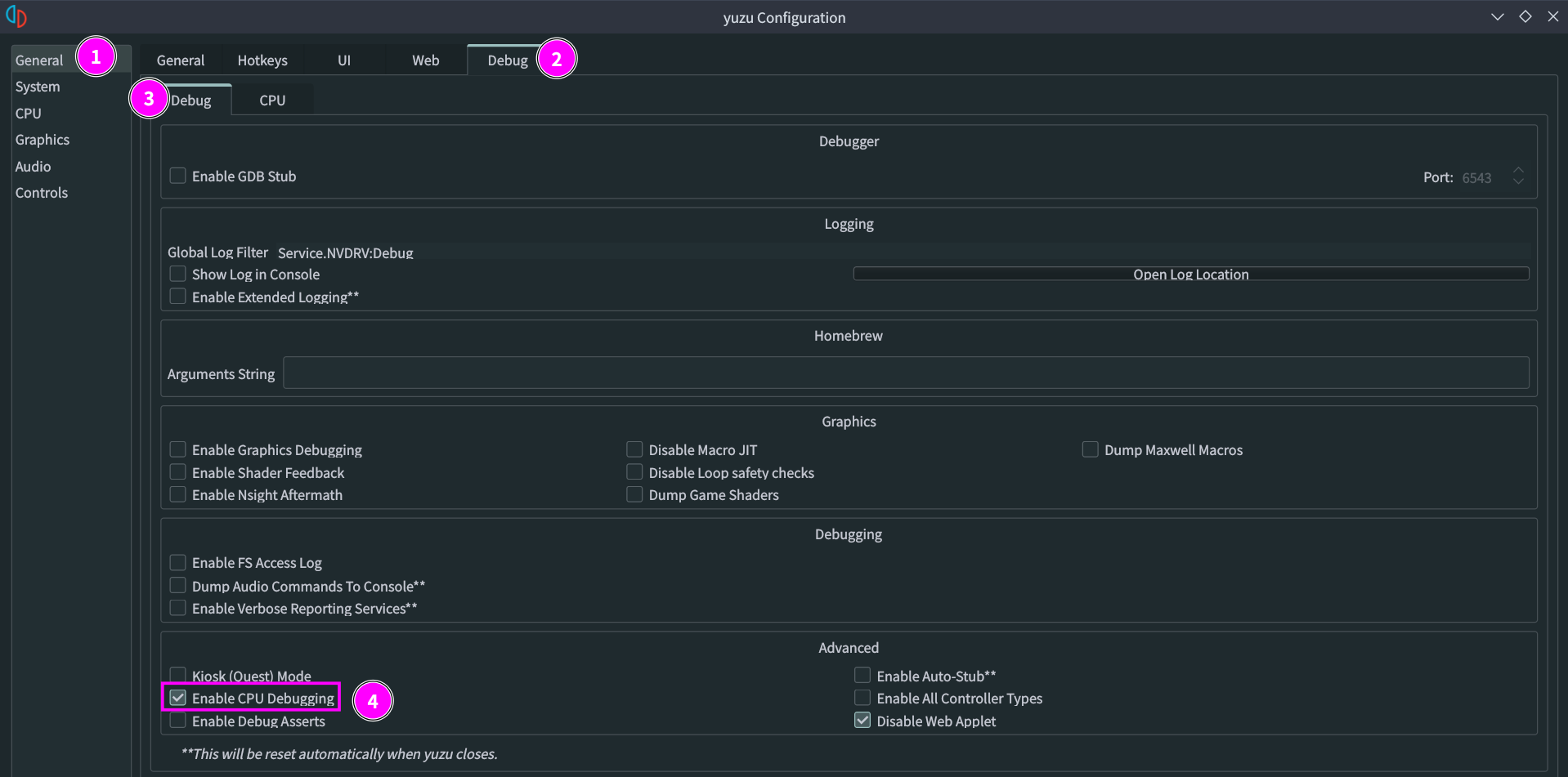
- Disable both Host MMU emulation options
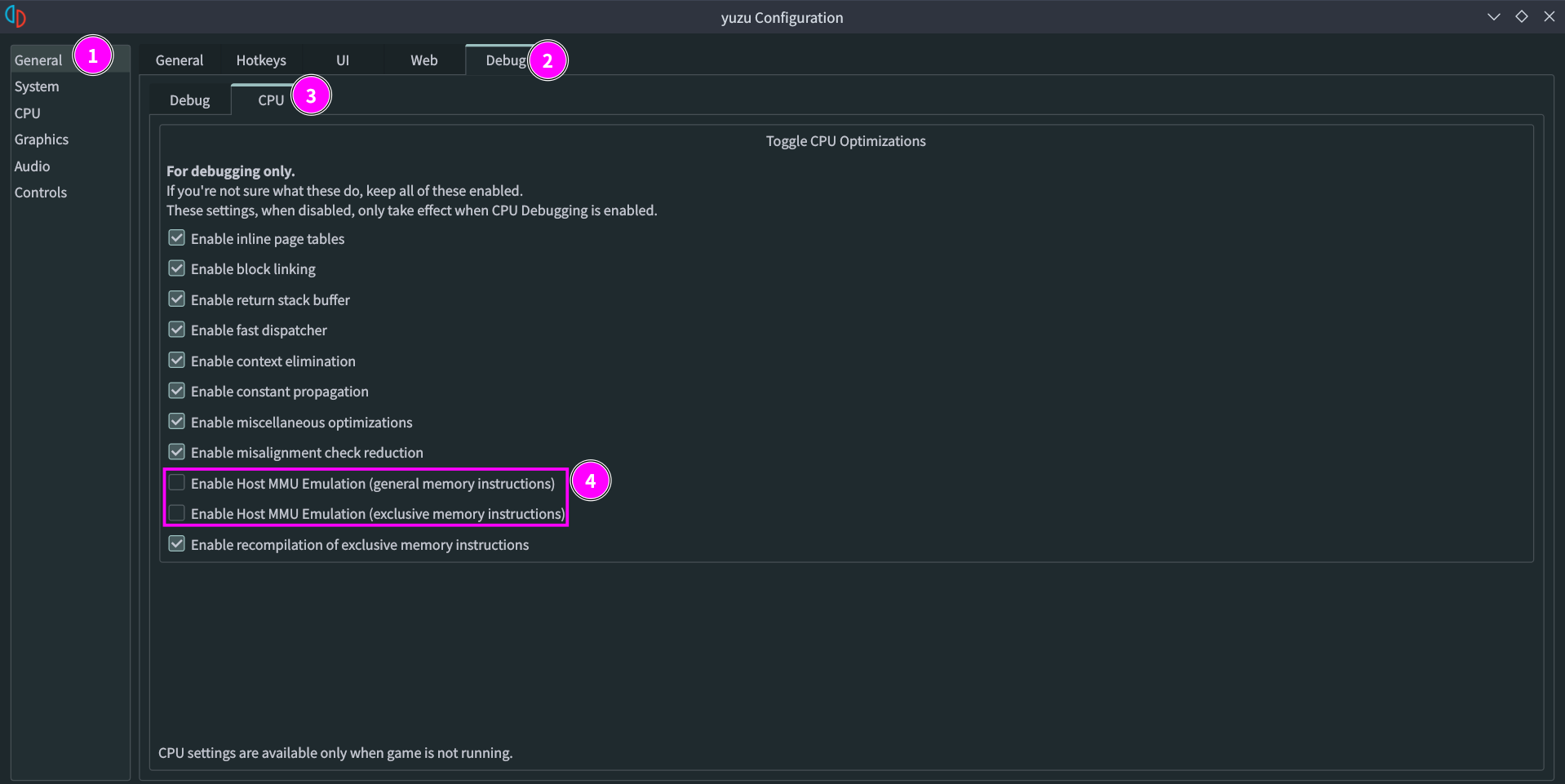
- Run gdb
cd data
gdb ../build/bin/yuzu            # Start GDB
(gdb) handle SIGSEGV nostop      # Disable SIGSEGV exceptions, which are used by yuzu for memory access
(gdb) run                        # Run yuzu under GDB
<crash>
(gdb) bt                         # Print a backtrace of the entire callstack to see which codepath the crash occurred on